Hostinger combines low introductory prices, a beginner-friendly control panel, built-in WordPress tools, website-building features and global hosting infrastructure. It is an especially compelling option for new websites and budget-minded site owners, but long-term renewal pricing and the lack of phone support are worth considering before you commit.
Hostinger at a glance
Hostinger stands out for its combination of accessible pricing, simple site management, WordPress-focused features and a modern custom dashboard. It is best suited to beginners, bloggers, freelancers and small businesses that want strong everyday hosting without paying premium-host prices.
What I like
- Competitive long-term introductory pricing
- Simple custom hPanel control panel
- Free SSL and website migration tools
- WordPress installation and optimization features
- Built-in website builder and AI-assisted tools
- Multiple hosting tiers for future growth
What could be better
- Best advertised prices usually require long commitments
- Renewal rates are significantly higher than intro rates
- No traditional phone-support channel
- Entry plans are not meant for heavy, resource-intensive websites
- Plan names and included limits can change over time
What is Hostinger?
Hostinger is a web-hosting company offering managed web hosting, WordPress hosting, cloud hosting, VPS hosting, domain services, email products and a website builder. Instead of using the familiar cPanel interface found at many traditional hosts, Hostinger uses its own dashboard called hPanel.
That distinction matters because hPanel is one of the reasons Hostinger feels approachable. Everyday tasks such as creating a site, installing WordPress, managing domains, creating email accounts, accessing backups and checking performance settings are presented inside a cleaner, more guided interface.
Hostinger is not trying to be the most luxurious managed WordPress provider on the market. Its strongest appeal is value: it packages the features most small website owners need into plans that are usually inexpensive during the initial term.
Bottom line: If you are launching a blog, affiliate site, portfolio, local-business website or small online store, Hostinger gives you a lot of useful functionality without making the setup process unnecessarily technical.
Hostinger plans and pricing
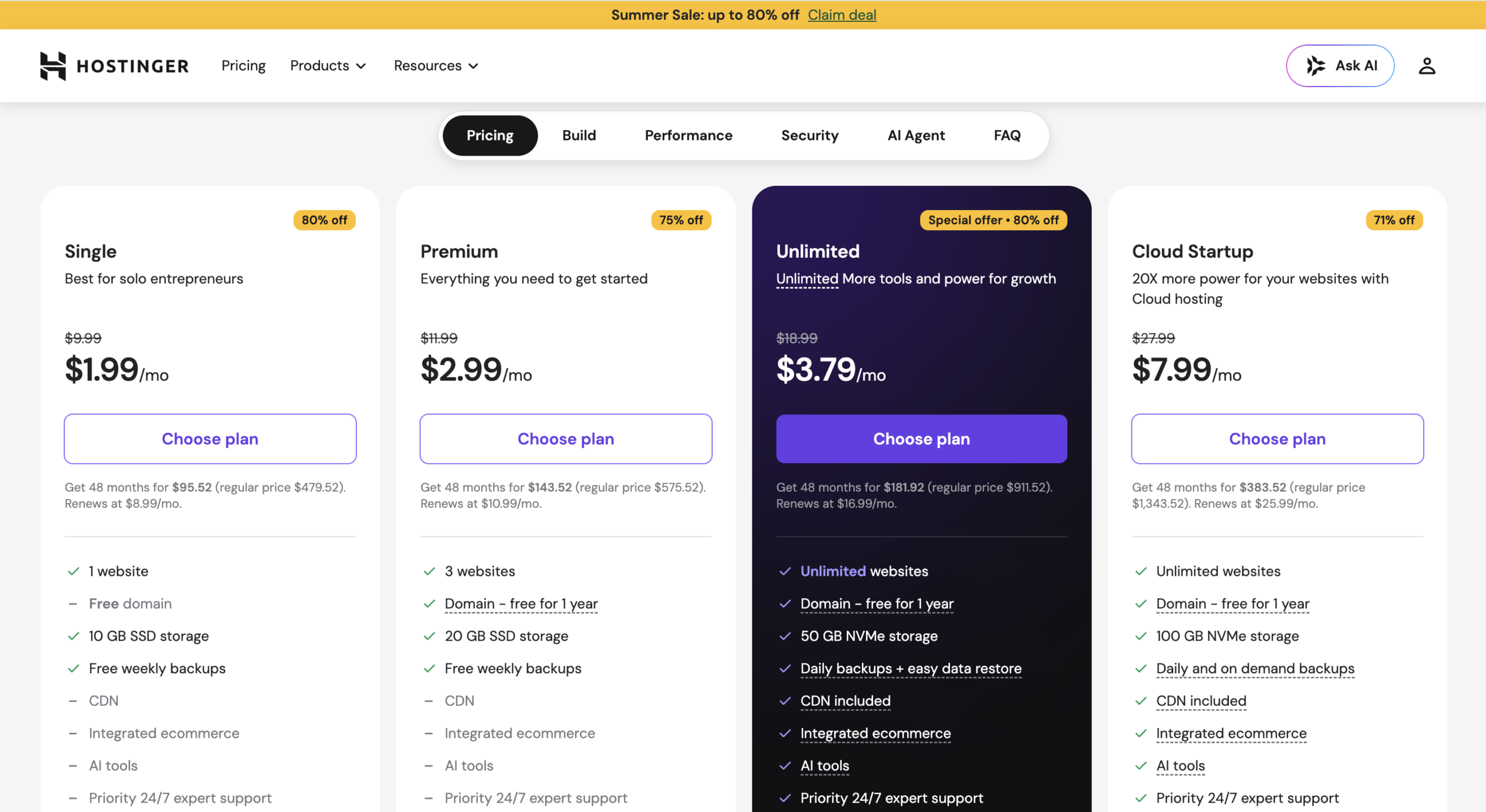
Hostinger frequently changes discounts, plan names and promotional terms. At the time this review was prepared, its main web-hosting page prominently displayed Premium, Unlimited and Cloud Startup offers. The lowest monthly equivalent price is generally tied to a multi-year upfront purchase, while renewal pricing is higher.
Premium
Best for new blogs, portfolios and smaller websites.
- Multiple website support
- Free domain on eligible terms
- SSD storage
- Weekly backups
- SSL and WordPress tools
Unlimited
A stronger fit for multiple sites and growing projects.
- Unlimited websites under current offer
- NVMe storage
- Daily backups
- CDN included
- More email and AI features
Cloud Startup
For busier sites, agencies and resource-hungry projects.
- More computing resources
- NVMe storage
- Daily/on-demand backups
- CDN included
- Designed for higher traffic
*Pricing shown reflects promotional monthly-equivalent pricing observed on Hostinger’s public web-hosting page on August 10, 2026 and may require a 48-month upfront purchase. Taxes, regional pricing, discounts, plan names, included limits and renewal rates may change. Always verify the checkout page before purchasing.
The important detail: introductory price vs. renewal price
This is the part of budget hosting that deserves the most attention. A plan advertised at a very low monthly equivalent can be excellent value, but only if you are comfortable paying for a longer term upfront. When the initial term ends, your monthly-equivalent renewal cost can rise substantially.
My recommendation is to judge Hostinger using the total cost across the entire first term rather than focusing only on the large monthly number displayed in an ad. Then check the renewal price and decide whether that future cost still makes sense for your website.
| Cost factor | What to check | Why it matters |
|---|---|---|
| Introductory rate | Length of commitment required | Lowest rates commonly require paying several years upfront. |
| Renewal rate | Price after the initial term | Your long-term hosting cost can be much higher than the first-term price. |
| Free domain | Eligibility and first-year limitations | Useful savings initially, but domain renewal becomes a separate recurring cost. |
| Number of mailboxes and free period | Email inclusions vary by plan and promotional term. | |
| Backups | Weekly, daily or on-demand | More frequent backups become more important as a site generates sales or leads. |
Ease of use: hPanel is one of Hostinger’s strongest advantages
Hosting dashboards are often designed around server terminology instead of the way normal site owners think. Hostinger takes a more guided approach. Its hPanel organizes websites, domains, email, security, backups, performance and account settings into a visually straightforward interface.
For beginners, that can remove a lot of friction. You do not need to understand every server setting to publish a WordPress site. Hostinger can take care of the initial installation, connect a domain and surface many of the controls you will use most frequently.
Hostinger for WordPress
WordPress is where Hostinger makes the most sense for many buyers. The platform can install WordPress, provide SSL, manage server-side features and offer performance optimizations without forcing beginners to assemble everything from separate providers.
Hostinger also emphasizes LiteSpeed-based hosting technology, caching and a built-in CDN on eligible plans. For a typical blog or business site, that combination can provide a strong starting point before you begin adding your own WordPress caching, image optimization and database-maintenance strategy.
Fast WordPress setup
Create a new WordPress installation from the account dashboard instead of manually configuring a database.
SSL included
HTTPS support is part of the hosting experience, which removes another common setup expense for new sites.
Migration support
Existing site owners can request migration instead of rebuilding a WordPress website from scratch.
Performance tools
LiteSpeed technology, caching options and CDN availability give WordPress owners useful performance controls.
Is Hostinger good for affiliate websites?
Yes, for most small-to-medium affiliate websites. A content site typically needs reliable WordPress hosting, decent loading speed, SSL, backups and enough storage for images and plugins. Hostinger covers those basics at an attractive initial cost. If your site eventually grows into a high-traffic publication, you can move upward into a cloud tier or a more specialized hosting environment.
Performance and reliability
Hosting performance depends on much more than the company name. Your theme, plugin stack, image sizes, database, visitor location, traffic spikes and caching strategy can all affect real-world speed. That is why it is better to judge Hostinger as a complete performance platform rather than promise one universal load-time number.
Hostinger’s managed web-hosting platform currently promotes NVMe storage on higher tiers, LiteSpeed servers, CDN functionality, object caching and a global data-center network. These are meaningful ingredients for a fast site, especially when paired with a lightweight WordPress theme and properly compressed images.
How to get the best speed from Hostinger
- Choose a server location close to your primary visitors.
- Use WebP or AVIF images and avoid uploading huge uncompressed photos.
- Keep WordPress plugins limited to tools you actually need.
- Enable caching and Hostinger’s CDN features where available.
- Use a lightweight theme and avoid oversized page-builder effects.
- Test Core Web Vitals after adding ads, analytics and affiliate scripts.
Security, SSL and backups
Hostinger’s current managed hosting offering includes SSL, malware-related protection and backup features, with backup frequency varying by plan. For most WordPress owners, the fact that these tools are integrated into the hosting account is preferable to having no server-side safety net at all.
Still, hosting security should never be treated as a one-click feature. Use strong unique passwords, enable two-factor authentication when available, update WordPress core and plugins promptly, and maintain an independent backup for a business-critical website.
Practical security rule: Your host’s backup is useful for fast restores, but important websites should also keep a separate off-site copy that you control.
Customer support: strong online help, but no phone-first experience
Hostinger provides 24/7 support through online channels and maintains a large collection of tutorials and knowledge-base material. For people comfortable using chat, this fits the rest of Hostinger’s digital-first experience well.
The downside is simple: customers who strongly prefer calling a support number may find Hostinger less appealing than hosts built around phone support. This is not automatically a deal-breaker, but it is an important buying criterion for business owners who want to explain urgent problems verbally.
Website builder and AI tools
Hostinger now stretches beyond traditional hosting. It promotes a drag-and-drop builder, AI-assisted site creation, marketing tools and AI features intended to help customers publish websites without writing every page manually. This makes the service particularly attractive to first-time site owners who want hosting and site creation under one account.
Experienced WordPress users may not need many of these extras, but they still add value for clients, freelancers and small businesses that want an easier route from “I need a website” to a live site.
Cloud hosting and VPS: room to grow
A common concern with inexpensive shared hosting is what happens when your website outgrows it. Hostinger offers cloud and VPS products in addition to managed web hosting, so you are not necessarily forced to change companies the moment your resource needs increase.
Cloud hosting is the more natural upgrade for many nontechnical site owners because it provides additional resources while remaining closer to a managed experience. VPS hosting is better suited to users who understand server administration or have a developer managing the environment.
Hostinger vs. other popular web hosts
If you want a broader comparison before choosing, see my best blog hosting sites guide.
| Provider type | Hostinger advantage | Where a competitor may win |
|---|---|---|
| Budget shared hosts | Modern dashboard, aggressive multi-year pricing, integrated builder and WordPress tools | Some competitors offer cPanel or stronger phone support |
| Managed WordPress hosts | Much lower starting cost | Premium hosts may provide deeper WordPress-specific support and higher resource allocations |
| Cloud platforms | Far easier for beginners | Developer cloud platforms provide more granular infrastructure control |
| Website builders | Hosting and WordPress remain available if your needs change | Dedicated builders can have larger app ecosystems or specialized design workflows |
Hostinger vs. Bluehost
Both are natural candidates for WordPress beginners. Hostinger’s appeal is its custom hPanel, low long-term promotional pricing and broad collection of integrated website tools. Bluehost may be more familiar to buyers who want a traditional WordPress-oriented onboarding ecosystem. Compare the exact renewal cost and included backup/email limits at checkout rather than deciding solely from the introductory price.
Hostinger vs. SiteGround
SiteGround is often positioned as a more premium managed shared-hosting experience, while Hostinger competes more aggressively on price. For a new content site, Hostinger can be the better value. For customers who put a higher premium on managed WordPress features, read my SiteGround review 2026 before deciding.
Hostinger vs. GoDaddy
GoDaddy has enormous brand recognition and a broad domain-registration ecosystem. Hostinger’s experience is attractive when your priority is inexpensive website hosting paired with a streamlined custom dashboard. Again, compare the full first-term and renewal costs for the exact configuration you need.
Want to try Hostinger?
Hostinger is easiest to recommend to new WordPress users, bloggers, affiliate marketers and small-business owners who want a simple dashboard and a low first-term cost. Check the live offer before buying because discounts and plan features can change.
See Today’s Hostinger OfferWho should use Hostinger?
Hostinger is a great fit if you:
- Are starting your first WordPress website.
- Run a blog, portfolio, affiliate site or small-business site.
- Want hosting that does not require learning cPanel immediately.
- Prefer a low introductory cost and are comfortable paying a longer term upfront.
- Want hosting, domain tools, email, website building and AI features in one ecosystem.
- Expect to upgrade to cloud hosting later as your traffic grows.
You may want another host if you:
- Need phone support as your primary way of getting technical help.
- Want a short month-to-month commitment at the same price as a multi-year promotion.
- Operate a very large mission-critical ecommerce site that needs enterprise-level resources.
- Need highly customized server configurations without moving to a VPS.
- Prefer cPanel specifically and do not want to learn a different interface.
How I evaluate Hostinger
A web-hosting review should look beyond the headline price. This evaluation compares Hostinger’s published plan information, hPanel and WordPress functionality, included features, security and backup options, upgrade paths, support channels and pricing structure. I do not present laboratory speed tests or uptime measurements that I did not personally collect.
I also separate features that matter to beginners from features aimed at advanced users. A VPS can be powerful, for example, but it is not automatically a better purchase for someone launching a simple business website. The best host is the one that gives you enough performance and control without creating unnecessary complexity.
| Category | What I check | Hostinger assessment |
|---|---|---|
| Pricing and value | Introductory price, commitment and renewal cost | Excellent first-term value; renewal cost needs attention. |
| Ease of use | Dashboard, setup and routine site management | One of the more beginner-friendly hosting dashboards. |
| Performance tools | Hosting stack, caching, CDN and storage features | Strong feature set for typical WordPress and business sites. |
| Security and backups | SSL, malware protection and backup frequency | Good integrated baseline; backup frequency varies by tier. |
| Support | Availability and support channels | 24/7 online help, but phone-first users may prefer alternatives. |
| Scalability | Cloud and VPS upgrade paths | Cloud and VPS tiers provide a practical growth path. |
Hostinger review: the final verdict
Hostinger earns a strong recommendation for value-conscious website owners. Its biggest strengths are straightforward onboarding, a clean custom dashboard, WordPress-friendly features, useful performance tools and an aggressive introductory price structure.
The biggest caution is not performance or usability—it is pricing expectations. The cheapest advertised monthly equivalent generally comes from a long prepaid term, and renewal pricing can be substantially higher. If you understand that trade-off before purchasing, Hostinger can be one of the better-value ways to launch and grow a WordPress site.
For a new blogger, affiliate marketer, freelancer or small business, I would place Hostinger near the top of the shortlist. High-traffic businesses and customers who require phone support should compare more specialized options before deciding.
Hostinger FAQ
Hostinger setup and features
Is Hostinger good for beginners?
Yes. Hostinger’s hPanel, guided WordPress setup, website builder and integrated domain/SSL tools make it relatively approachable for people launching their first site.
Is Hostinger good for WordPress?
It is a strong value option for WordPress blogs, affiliate sites, portfolios and small-business websites. It includes WordPress installation and performance-related hosting features without requiring a premium managed-WordPress budget.
Does Hostinger include a free domain?
Eligible hosting plans and subscription terms can include a free domain for the first year. Check the current plan details before checkout because eligibility can change.
Does Hostinger provide free SSL?
Hostinger currently includes SSL certificates with its managed web-hosting plans, helping you enable HTTPS without purchasing a separate certificate.
Can Hostinger migrate my existing website?
Hostinger advertises website migration support for customers moving existing sites to its platform. Migration availability and the exact process can depend on your current website configuration.
Hostinger pricing and support questions
Does Hostinger have phone support?
Hostinger focuses on online customer-support channels rather than traditional phone-first support. If phone help is essential for your business, compare this with another host before purchasing.
Is the cheapest Hostinger price available month to month?
Usually no. The lowest displayed monthly-equivalent prices are normally connected to longer prepaid subscription terms. Shorter terms generally cost more per month.
What happens when my Hostinger plan renews?
Introductory promotions end and the plan renews at the then-applicable renewal rate. Always check the renewal figure shown on the pricing or checkout page before purchasing.




Pingback: Cloudways Hosting Review 2026: Is It Worth It for WordPress?
Pingback: TMDHosting Reviews 2026 – Not Bad, but What’s the Catch?
Pingback: How to Build an Affiliate Marketing Website in 2026 (Step-by-Step)
Pingback: 29 Ways How to Make Money Online in 2026: Realistic Methods