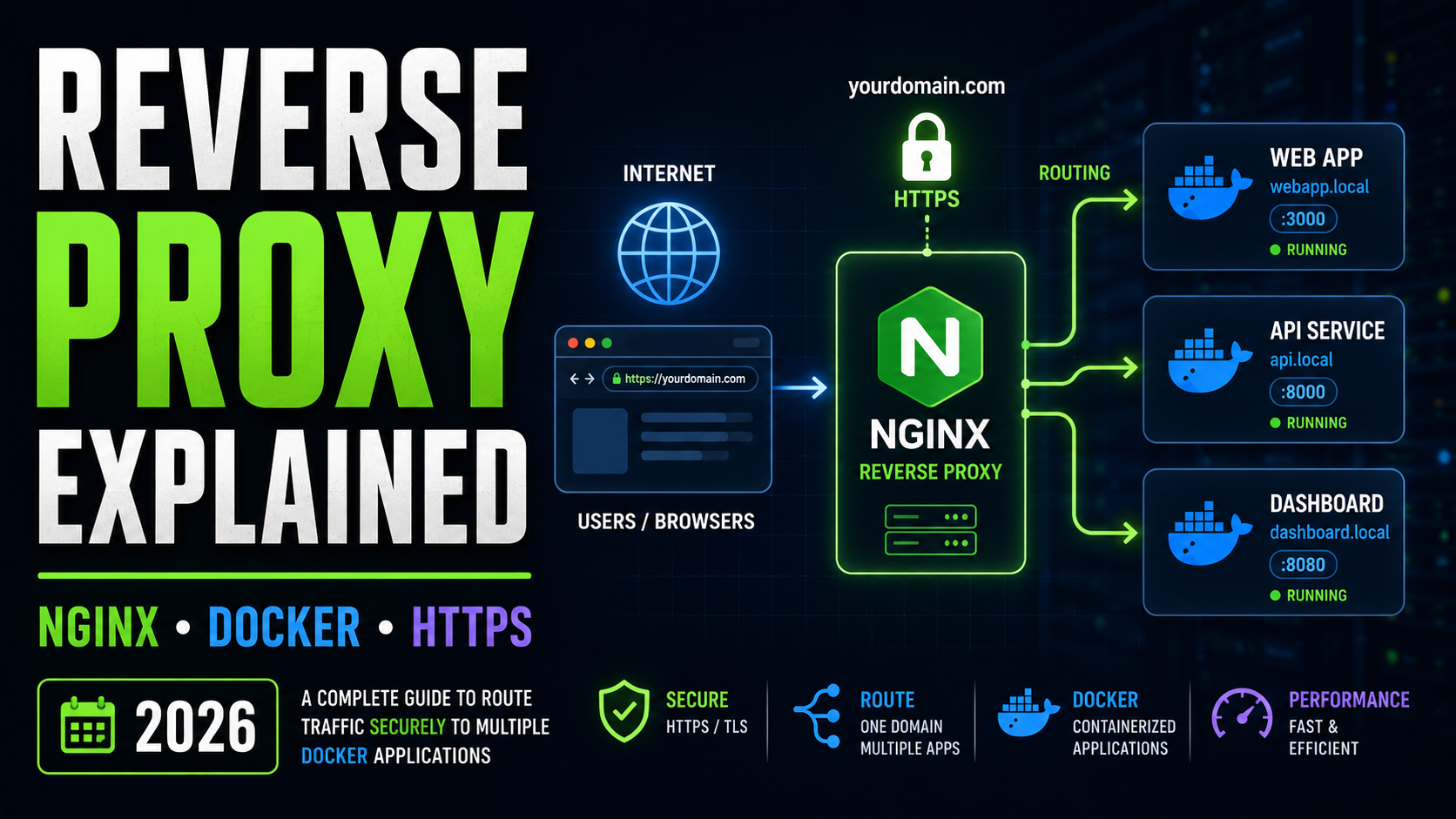
Reverse Proxy Explained: One Domain, Multiple Apps
A reverse proxy lets you run several websites, dashboards, Docker containers, APIs, and self-hosted tools on the same server while giving every application a clean domain or subdomain and secure HTTPS access.
TL;DR
Your VPS normally has one public IP address, while normal web traffic arrives
through ports 80 and 443. A reverse proxy such as nginx sits at those public
ports, looks at the hostname requested by the visitor, and forwards the traffic
to the correct application running privately elsewhere on the server.
That means multiple applications can share one server without forcing visitors
to remember URLs such as :8081, :8082, or
:9000.
Imagine that you host an uptime monitor, an automation platform, an internal dashboard, and a private AI tool on a single VPS. You could expose every application using a different port number. Technically, that works. It quickly becomes difficult to maintain, however, and it exposes more services directly to the public internet.
A reverse proxy gives you a cleaner architecture. Visitors connect to one front-facing service. That service decides which application should handle each request.
Reverse Proxy Terminology for Beginners
Before configuring nginx, it helps to understand a few terms that appear throughout nearly every self-hosting tutorial.
A numbered network endpoint. Web servers commonly receive HTTP traffic on port 80 and encrypted HTTPS traffic on port 443.
An isolated package containing an application and the dependencies it needs to run.
The hostname included with an HTTP request, such as
monitor.example.com. nginx can use it to select a destination.
A DNS record connecting a hostname or subdomain to an IPv4 address.
The server’s loopback address. Services bound to it are accessible locally without automatically being exposed through the server’s public interface.
An nginx configuration section describing which hostname nginx should accept and where requests for that hostname should go.
The encryption technology behind HTTPS. It protects information traveling between the visitor’s browser and your server.
A certificate authority offering free TLS certificates that can be automated using tools such as Certbot.
What you will understand by the end
- Why one IP address can serve many applications.
- How nginx decides which Docker container receives a request.
- Why subdomains are useful for self-hosted apps.
- How to keep application ports private.
- How HTTPS terminates at the reverse proxy.
- How nginx differs from a forward proxy and a load balancer.
- When to choose nginx, Caddy, Traefik, HAProxy, or Nginx Proxy Manager.
What Is a Reverse Proxy?
A reverse proxy is a server that accepts incoming connections before they reach your backend applications. It receives the visitor’s request, chooses the appropriate destination, sends the request to that application, receives its response, and then returns the response to the visitor.
From the visitor’s perspective, the reverse proxy is the website.
Your underlying application may actually be listening privately on
127.0.0.1:8081, but the visitor only sees a normal address such as
https://status.example.com.
Think of it as the reception desk of an office building. Everyone enters through the lobby. The receptionist identifies which business the visitor needs and sends them to the correct room. Individual rooms do not need their own entrances from the street.
How a Reverse Proxy Works
DNS first directs the visitor toward your server’s IP address. Once the request reaches nginx, nginx reads information including the requested hostname. A matching configuration rule tells nginx where to send that request.
For example:
status.example.com  →  127.0.0.1:8081
draw.example.com    →  127.0.0.1:8082
tools.example.com   →  127.0.0.1:8083
All three domains can point to exactly the same public IP address. nginx is responsible for separating their traffic after it reaches the server.
The Problem a Reverse Proxy Solves
Suppose three Docker applications run on one VPS. Without a reverse proxy, you might publish all three ports directly.
Without a Reverse Proxy
Visitors must remember port numbers, and multiple application ports may become publicly reachable.
With a Reverse Proxy
The applications share one public entry point while retaining separate names.
Browsers naturally expect standard HTTP and HTTPS services on ports 80 and 443. A reverse proxy can occupy those ports and distribute requests to any number of backend ports.
Adding another application later can be as simple as creating another DNS record and another routing configuration.
Forward Proxy vs Reverse Proxy
The words sound similar because both systems act as intermediaries. The important difference is which side of the connection they represent.
| Feature | Forward Proxy | Reverse Proxy |
|---|---|---|
| Represents | Clients | Servers or applications |
| Traffic direction | Users going toward the internet | Internet users reaching your applications |
| Usually configured by | User or network administrator | Server administrator |
| Common uses | Filtering, privacy, outbound access control | HTTPS termination, app routing, caching, protection and load balancing |
| Examples | Squid and some enterprise proxy systems | nginx, Caddy, Traefik, HAProxy |
Reverse Proxy vs Load Balancer
Reverse proxies and load balancers overlap because software such as nginx can perform both jobs. Their purposes are nevertheless different.
A reverse proxy commonly routes different destinations to different applications:
crm.example.com      → CRM application
status.example.com   → monitoring application
api.example.com      → API server
A load balancer instead distributes requests for the same application among multiple copies of it:
api.example.com
        ↓
Load Balancer
   ↙     ↓     ↘
API #1  API #2  API #3
Load balancing becomes useful when one application needs redundancy or more capacity than a single instance can provide.
Popular Reverse Proxy Tools
nginx is far from your only option. The best reverse proxy depends on how much manual control and automation you want.
nginx
Extremely popular, mature, fast, and supported by a huge collection of documentation and community examples.
Visit nginx →Caddy
A modern web server known for making HTTPS and reverse-proxy configuration particularly concise.
Visit Caddy →Traefik
Designed around dynamic environments and commonly paired with Docker and container platforms.
Visit Traefik →HAProxy
A mature proxy and load-balancing platform frequently used where traffic management is especially important.
Visit HAProxy →Nginx Proxy Manager
Provides a graphical interface for managing nginx proxy hosts and certificates.
Visit Nginx Proxy Manager →Cloudflare
Cloudflare can sit in front of your origin server and proxy traffic through its global network.
Visit Cloudflare →Build an nginx Reverse Proxy for Three Docker Apps
Now we can turn the concept into an actual server layout.
Before starting
You should already have a VPS running a current Ubuntu release, root or sudo access, Docker installed, and a domain whose DNS records you can modify. Commands may need adjustment for your environment.
| Application | Private Address | Example Domain |
|---|---|---|
| Uptime Kuma | 127.0.0.1:8081 |
status.example.com |
| Excalidraw | 127.0.0.1:8082 |
draw.example.com |
| Whoami | 127.0.0.1:8083 |
whoami.example.com |
Point Your Subdomains to the VPS
Create an A record for every application.
status.example.com    A    203.0.113.10
draw.example.com      A    203.0.113.10
whoami.example.com    A    203.0.113.10
Notice that every hostname points to the same server IP. DNS gets the visitor to the correct server. nginx determines which application should receive the request after it arrives.
Start the Docker Containers Privately
Bind each published port to 127.0.0.1 rather than every network
interface.
docker run -d \
  --name uptime-kuma \
  --restart unless-stopped \
  -p 127.0.0.1:8081:3001 \
  -v uptime-kuma:/app/data \
  louislam/uptime-kuma:1


docker run -d \
  --name excalidraw \
  --restart unless-stopped \
  -p 127.0.0.1:8082:80 \
  excalidraw/excalidraw:latest


docker run -d \
  --name whoami \
  --restart unless-stopped \
  -p 127.0.0.1:8083:80 \
  traefik/whoami
The first mapping, for example, connects the container’s port
3001 to port 8081 on the server’s loopback address.
nginx can communicate with it locally.
Why bind Docker ports to 127.0.0.1?
When the application only needs to receive traffic from a reverse proxy on the same machine, keeping the backend port on loopback reduces unnecessary direct exposure. nginx becomes the controlled public entry point.
Confirm that the containers are running:
docker psYou can also inspect listening ports:
ss -tlnpInstall nginx
Install nginx from Ubuntu’s package repository.
sudo apt update
sudo apt install -y nginx
Confirm that nginx is running:
sudo systemctl status nginxCreate an nginx Server Block
We’ll begin with Uptime Kuma.
Create:
/etc/nginx/sites-available/status.example.comAdd:
server {
    listen 80;
    listen [::]:80;

    server_name status.example.com;

    location / {
        proxy_pass http://127.0.0.1:8081;

        proxy_set_header Host $host;
        proxy_set_header X-Real-IP $remote_addr;
        proxy_set_header X-Forwarded-For $proxy_add_x_forwarded_for;
        proxy_set_header X-Forwarded-Proto $scheme;

        proxy_http_version 1.1;
        proxy_set_header Upgrade $http_upgrade;
        proxy_set_header Connection "upgrade";
    }
}
Two directives explain most of the reverse proxy:
server_name status.example.com;

proxy_pass http://127.0.0.1:8081;
The first identifies requests nginx should match. The second identifies the backend application that should receive them.
Configure Excalidraw
server {
    listen 80;
    listen [::]:80;

    server_name draw.example.com;

    location / {
        proxy_pass http://127.0.0.1:8082;

        proxy_set_header Host $host;
        proxy_set_header X-Real-IP $remote_addr;
        proxy_set_header X-Forwarded-For $proxy_add_x_forwarded_for;
        proxy_set_header X-Forwarded-Proto $scheme;
    }
}
Configure Whoami
server {
    listen 80;
    listen [::]:80;

    server_name whoami.example.com;

    location / {
        proxy_pass http://127.0.0.1:8083;

        proxy_set_header Host $host;
        proxy_set_header X-Real-IP $remote_addr;
        proxy_set_header X-Forwarded-For $proxy_add_x_forwarded_for;
        proxy_set_header X-Forwarded-Proto $scheme;
    }
}
Create a Default Catch-All
You can also configure a default nginx server that does not expose a normal website when somebody requests an unknown hostname or browses directly to the server IP.
server {
    listen 80 default_server;
    listen [::]:80 default_server;

    server_name _;

    return 444;
}
The nginx-specific status 444 closes the connection without
returning a normal HTTP response.
Enable the Sites
Create symbolic links in sites-enabled.
sudo ln -s /etc/nginx/sites-available/status.example.com /etc/nginx/sites-enabled/
sudo ln -s /etc/nginx/sites-available/draw.example.com /etc/nginx/sites-enabled/
sudo ln -s /etc/nginx/sites-available/whoami.example.com /etc/nginx/sites-enabled/
Then test the configuration:
sudo nginx -tIf the test succeeds, reload nginx:
sudo systemctl reload nginxHow nginx Makes the Routing Decision
Add HTTPS With Let’s Encrypt and Certbot
The reverse proxy can also handle TLS for all of your backend applications. The containers themselves can continue communicating with nginx over a local HTTP connection.
Install Certbot and its nginx integration:
sudo apt install -y certbot python3-certbot-nginxThen request certificates:
sudo certbot --nginx \
  -d status.example.com \
  -d draw.example.com \
  -d whoami.example.com
Follow Certbot’s prompts. Once configured successfully, visitors can reach:
https://status.example.com
https://draw.example.com
https://whoami.example.com
Why HTTPS at the proxy is convenient
Instead of teaching every container to obtain and renew certificates, the internet-facing reverse proxy can manage HTTPS in one layer. This architecture is often called TLS termination.
You can inspect Certbot’s renewal timer with:
systemctl list-timers | grep certbotAnd perform a simulated renewal test using:
sudo certbot renew --dry-runWhat Are X-Forwarded-For and Other Proxy Headers?
Once nginx sits between the visitor and the application, the backend’s direct network connection comes from the proxy rather than directly from the original visitor.
Proxy headers preserve important information about the original request.
| Header | Purpose |
|---|---|
Host |
Preserves the hostname requested by the visitor. |
X-Real-IP |
Can carry the original client’s IP address. |
X-Forwarded-For |
Maintains information about clients and proxies involved in the request. |
X-Forwarded-Proto |
Indicates whether the original request used HTTP or HTTPS. |
That is why nginx configurations frequently contain:
proxy_set_header Host $host;
proxy_set_header X-Real-IP $remote_addr;
proxy_set_header X-Forwarded-For $proxy_add_x_forwarded_for;
proxy_set_header X-Forwarded-Proto $scheme;
Some applications require you to explicitly mark your proxy as trusted before they will rely on forwarded headers. Always follow the application’s documentation when enabling this behavior.
Does a Reverse Proxy Make a Server More Secure?
A reverse proxy can improve your architecture by reducing how many application ports need to be publicly reachable and by giving you one controlled layer for TLS, logging, access rules and rate limiting.
However, installing nginx does not automatically secure a VPS. You still need proper application authentication, software updates, firewall rules, SSH hardening, backups, monitoring and sensible container configuration.
Public HTTPS hostnames can be discovered
Do not assume that an obscure subdomain is secret. Public certificate infrastructure and internet scanning can make new services discoverable. Protect administrative interfaces with strong authentication as soon as they are exposed.
Useful Security Practices
- Keep backend application ports private when direct access is unnecessary.
- Require strong passwords or single sign-on for administrative tools.
- Use HTTPS everywhere for browser-facing services.
- Patch nginx, Docker, Ubuntu and your applications regularly.
- Review nginx access and error logs.
- Back up application data before upgrades.
- Do not expose databases directly to the internet unless absolutely necessary.
- Add rate limiting where automated abuse is a concern.
Centralized nginx Logging
Another advantage of having a central web entry point is visibility. nginx can record requests passing through the proxy.
Common log locations include:
/var/log/nginx/access.log
/var/log/nginx/error.log
For example:
sudo tail -f /var/log/nginx/access.logThis is extremely useful when a container appears healthy but visitors are receiving a 404, 502 or another unexpected response.
What Does 502 Bad Gateway Mean?
A 502 Bad Gateway error commonly means nginx accepted the visitor’s request but could not successfully communicate with the backend service.
Check:
- Is the Docker container running?
- Is the port in
proxy_passcorrect? - Is the application actually listening on that port?
- Did the container restart or fail?
- Does nginx have the correct protocol: HTTP versus HTTPS?
Useful commands include:
docker ps
docker logs CONTAINER_NAME
curl http://127.0.0.1:8081
sudo nginx -t
sudo tail -n 100 /var/log/nginx/error.log
Does a Reverse Proxy Slow Down a Website?
Technically, a reverse proxy adds another processing step. In a properly configured local setup, however, the forwarding operation itself is normally very small compared with application processing, database queries, network latency, image transfer and other work involved in serving a modern page.
HTTPS connection setup can also affect benchmarks. Be careful when comparing a new TLS connection against an already-established local HTTP connection. Browsers normally reuse connections rather than performing an entirely new TLS handshake for every asset.
Measure Your Own Server
For a meaningful comparison, benchmark both the direct application and the proxied endpoint under equivalent conditions.
# Backend from the VPS
curl -o /dev/null -s \
  -w 'total=%{time_total}\n' \
  http://127.0.0.1:8083


# Public reverse-proxied endpoint
curl -o /dev/null -s \
  -w 'total=%{time_total}\n' \
  https://whoami.example.com
For serious testing, use repeated requests and a proper benchmarking tool rather than drawing conclusions from a single request.
Subdomains vs Path-Based Reverse Proxy Routing
You do not always need a different subdomain for every application. nginx can also route according to URL paths.
For example:
example.com/status/
example.com/draw/
example.com/tools/
An nginx configuration might include:
location /status/ {
    proxy_pass http://127.0.0.1:8081/;
}
The challenge is that some applications assume they are installed at the root of a domain. They may generate JavaScript, CSS, redirects, WebSocket addresses, cookies or API URLs that do not work correctly beneath a path prefix.
For that reason, subdomains are frequently simpler for independent self-hosted applications:
status.example.com
draw.example.com
tools.example.com
Reverse Proxies and WebSockets
Applications that maintain persistent browser connections may use WebSockets. In nginx, WebSocket applications commonly require HTTP/1.1 and upgrade headers.
proxy_http_version 1.1;
proxy_set_header Upgrade $http_upgrade;
proxy_set_header Connection "upgrade";
If an application works partially but live updates or real-time connections fail, check its reverse-proxy documentation for WebSocket requirements.
Is Cloudflare a Reverse Proxy?
Cloudflare can act as a reverse proxy in front of your origin server. When proxying is enabled for a DNS record, visitors connect to Cloudflare’s network, and Cloudflare connects onward to your server.
You can even have multiple layers: Cloudflare may proxy traffic to nginx, and nginx may then proxy that request to a Docker container.
Do You Have to Configure Reverse Proxies Manually?
No. Manual nginx configuration is valuable because it teaches you what the routing layer is doing, but several platforms automate most of the work.
Caddy
Caddy combines reverse proxying with automatic HTTPS and can make simple deployments remarkably short.
status.example.com {
    reverse_proxy 127.0.0.1:8081
}
Nginx Proxy Manager
Nginx Proxy Manager provides a browser-based administration panel. Instead of writing every server block manually, you define proxy hosts using forms and can manage certificates from the interface.
Traefik
Traefik is especially attractive for environments where containers are created and removed frequently. Docker labels can describe routing rules, allowing Traefik to discover services dynamically.
Coolify and Similar Platforms
Modern self-hosting platforms can hide most of the reverse-proxy plumbing. You deploy an application, assign a domain, and the platform configures routing and certificates for you.
Understanding nginx manually is still useful because errors such as failed certificate issuance, incorrect routes and gateway failures ultimately involve the same underlying concepts.
Which Reverse Proxy Should You Choose?
| If You Want… | Consider |
|---|---|
| Maximum documentation and manual control | nginx |
| Minimal configuration with automatic HTTPS | Caddy |
| Dynamic Docker-based routing | Traefik |
| A graphical management interface | Nginx Proxy Manager |
| Advanced load balancing and traffic management | HAProxy |
| Platform-managed deployments | Coolify or another PaaS-style platform |
Reverse Proxy Frequently Asked Questions
What is a reverse proxy in simple terms?
It is a server that receives incoming web traffic and sends each request to the correct application behind it. Visitors communicate with the proxy rather than connecting directly to every backend application.
Why would I use a reverse proxy with Docker?
It lets multiple Docker containers share standard web ports while receiving separate domains or subdomains. Backend container ports can remain local while the proxy manages public routing.
What is the difference between a forward proxy and a reverse proxy?
A forward proxy normally represents users making outbound connections. A reverse proxy represents servers receiving incoming connections.
Is nginx a reverse proxy?
nginx is a web server that can also operate as a reverse proxy, load balancer, cache and TLS termination layer.
Can one server host multiple domains?
Yes. Multiple DNS names can point to the same IP address. A reverse proxy can then route traffic according to the hostname included in the request.
Can I use one SSL certificate for several subdomains?
A certificate can contain multiple DNS names. Alternatively, you can issue separate certificates or use an appropriate wildcard certificate depending on your setup.
What is reverse proxy SSL termination?
SSL or TLS termination means the reverse proxy handles the encrypted HTTPS connection. It can then forward the request to a backend application using an appropriate internal connection.
Can a reverse proxy route by URL path?
Yes. nginx can route /api/ to one service and
/dashboard/ to another. Some applications behave better on
independent subdomains, however.
What is the difference between a reverse proxy and an API gateway?
An API gateway builds upon reverse-proxy concepts while commonly adding API-specific capabilities such as authentication, usage quotas, request transformation, analytics and rate limits.
Can a reverse proxy hide my application’s port?
Yes. Visitors can use a standard HTTPS address while nginx communicates with the application on an internal port. You should still configure networking and firewall rules correctly rather than relying on obscurity.
Does a reverse proxy replace a firewall?
No. A reverse proxy and a firewall solve different problems. A properly designed server commonly uses both.
Do I need nginx if I use Nginx Proxy Manager?
Nginx Proxy Manager uses nginx underneath and provides a management interface around it, so you generally do not need to create ordinary nginx proxy configurations by hand for hosts managed through the application.
Final Thoughts
The main idea behind a reverse proxy is much simpler than the configuration files initially make it appear.
Your public server has one front door. nginx, Caddy, Traefik or another proxy stands at that door. Every incoming request identifies the destination it wants, and the proxy forwards that request to the correct application.
Once you understand that architecture, technologies such as managed self-hosting platforms, Docker ingress systems, Cloudflare, Caddy and Traefik become much easier to understand because they are solving variations of the same routing problem.
Useful Reverse Proxy Resources
Continue learning with the official documentation for the technologies used in this tutorial.
Last updated: 2026. Always review current nginx, Docker and Certbot documentation before applying server configuration in production.