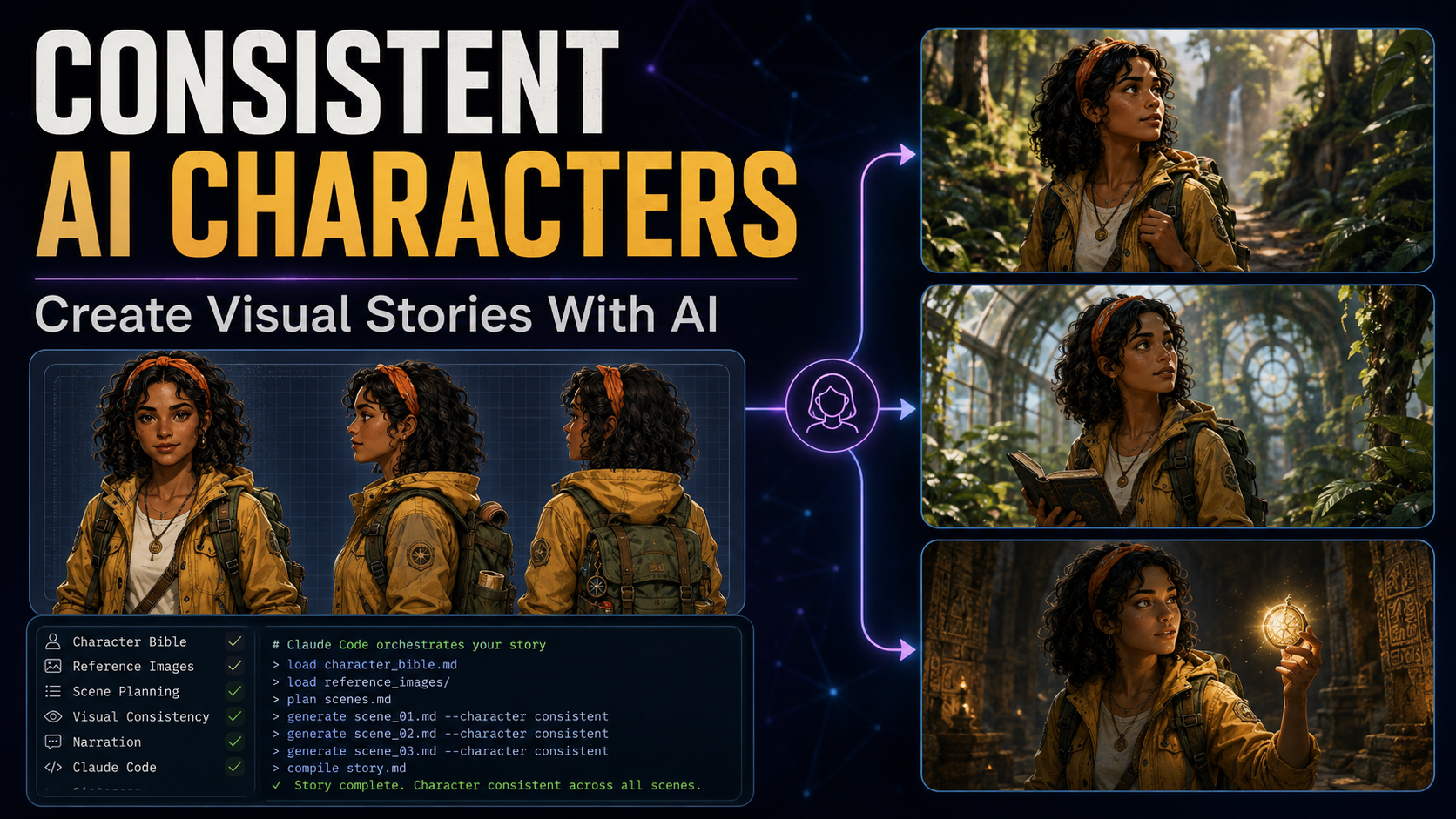
Learn how to keep the same AI character recognizable across multiple images and scenes using a character bible, approved reference images, continuity prompts, stable art direction and a repeatable production workflow.
Consistent AI Characters: Quick Start
In short, the goal is to lock the character’s identity before generating a full sequence. Then, reuse approved references, stable wardrobe details, scene continuity, and one visual style so later images feel like the same story.
Consistent AI characters come from controlling identity, not from repeating the same loose prompt. Define the character once, approve a reference image, reuse that reference in later generations, keep clothing and visual markers stable, and carry scene continuity forward when locations or lighting need to match.
Creating one attractive AI character is easy. However, creating a long sequence in which that character keeps the same face, hairstyle, clothing, age, proportions and personality is much harder.
In other words, the problem is often called character drift. It appears when an image model reinterprets the character every time you submit a new scene. The fix is to treat your visual story as a production system rather than a collection of unrelated prompts.
Article Navigation
Why AI Characters Change Between Scenes
For example, when you describe a character with text, an image model creates one interpretation of those words. Submitting a similar prompt again does not guarantee that every facial feature, clothing detail or body proportion will be interpreted the same way.
As a result, a prompt such as “Alex, a young explorer with brown curls and a blue jacket” can produce a convincing first image but a noticeably different person in the next image.
The Complete Consistent AI Character Workflow
Therefore, a visual-story workflow works best when the story moves through a predictable sequence instead of jumping directly from text to final images.
Meanwhile, Claude Code or another automation layer can coordinate the files and instructions, but the important part is the architecture: establish identity first, then generate scenes around that identity.
Step 1: Build a Character Bible Before Generating Scenes
First, a character bible defines the visual identity of every recurring character before you generate the main story sequence. Avoid vague descriptions. Decide the important details once.
Lock the physical characteristics
Define age range, skin tone, facial structure, eye color, hairstyle, hair color, height and general build. These details give the model fewer decisions to reinvent.
Lock the wardrobe
Clothing is one of the easiest elements for an image model to change. Keep the main outfit stable unless the story intentionally introduces a wardrobe change.
Add recognizable visual anchors
A headband, scarf, glasses, necklace, backpack or other distinctive accessory can help reinforce identity. A few strong markers are often more useful than a long list of vague adjectives.
Step 2: Generate an Approved Character Reference Image
However, text descriptions are useful, but a visual reference is stronger. Before generating the actual story scenes, create a clean reference image for each major recurring character.
Lena
Yellow jacket, orange headband, green explorer backpack.
Marcus
Blue cap, striped shirt, khaki shorts, small flashlight.
Grandmother Eva
Silver hair, glasses, blue cardigan, floral apron.
Reference rule
Once approved, treat the reference image as the source of truth for future scenes.
Use a relatively simple background so the character remains the dominant visual information. Then attach or reference that approved image whenever the same character appears later.
The scene changes. The identity does not.
Step 3: Carry Visual Continuity From One Scene to the Next
Importantly, character references tell the model who should appear. They do not automatically preserve the architecture, lighting, props or camera relationship between neighboring scenes.
If scene six happens inside an abandoned greenhouse at sunset and scene seven begins seconds later, the previous completed scene can be supplied as an additional visual reference. That gives the model both identity information and environmental continuity.
Of course, you do not need the previous frame for every scene. A scene planner can classify transitions as continuous, short jump, location change or intentional appearance change. That lets you use continuity references only where they help.
Generate the Story Scene by Scene
Next, break the written story into individual visual beats. Each scene should communicate one clear moment instead of asking the image model to interpret an entire chapter at once.
Keep the global art direction stable
Moreover, character consistency is only half of visual consistency. Define one global art direction and reuse it across every scene.
Whenever possible, generate clean artwork separately from dialogue, captions and narration. This gives you more control over typography, translations and later video editing.
Which AI Image Models Should You Use?
Ultimately, no single image generator is automatically best for every project. The key requirement is strong reference-image or identity-preservation support.
| Option | Useful for | What to test |
|---|---|---|
| Google image models | Detailed scenes and multi-character compositions | How well your exact reference workflow preserves identity |
| Seedream | Style experimentation and larger batches | Consistency across a long sequence |
| Fal | API-based image-generation workflows | Model choice, reference support and automation fit |
| Other reference-capable models | Custom pipelines | Identity preservation, cost and licensing |
Add One Consistent AI Narrator
In addition, illustrations create visual identity. Narration adds another layer of continuity. Generate audio scene by scene and keep the same narrator voice throughout the story.
Therefore, matching file numbers make later assembly much easier. You can also add restrained performance cues such as [softly], [curious] or [excited], but avoid over-directing every sentence.
ElevenLabs is one option for creating reusable narration voices.
Package the Story Into an Interactive HTML Player
Finally, once you have numbered scene images and matching narration files, a simple web interface can combine them into an interactive story experience.
The finished player can live on your own domain, inside a web application or as a client deliverable. Keeping images and audio separate is usually easier for larger projects.
Where Claude Code Fits Into the Workflow
Instead, Claude Code can act as the coordinator rather than the image generator itself. It can organize story files, character specifications, scene prompts, narration scripts and publishing assets.
A modular setup makes it easier to improve one stage without rebuilding the whole system. You can create separate instructions for story analysis, character design, scene splitting, prompt building, image generation, narration and publishing.
How Much Does a Consistent AI Character Workflow Cost?
There is no universal project cost. Your total depends on the image model, number of scenes, rejected generations, resolution, narration provider and the number of recurring characters.
| Production stage | What creates cost | How to reduce waste |
|---|---|---|
| Reference images | Initial character designs | Finalize the character bible before generating |
| Story scenes | One or more generations per scene | Reuse references and clear scene descriptions |
| Narration | Voice generation based on script length | Approve the script first |
| Regeneration | Inconsistent or unusable outputs | Improve references and continuity rules |
For commercial work, verify current pricing and licensing terms directly with every image, voice and model provider you use.
What Can You Create With Consistent AI Characters?
Illustrated stories
Build visual storybooks with recurring characters that remain recognizable.
YouTube stories
Turn scenes and narration into slideshow, Shorts or long-form storytelling videos.
Social content
Create recurring personalities for Instagram, TikTok and branded visual series.
Educational content
Use the same guide or mascot across lessons and explanations.
Brand campaigns
Create fictional mascots or recurring characters that stay recognizable across ads.
Interactive experiences
Reuse generated character assets inside web apps, games and story experiences.
Build a Character Identity System, Not Just a Prompt
Separate Stable Traits From Scene Variables
A strong character workflow treats identity as structured production data. Instead of storing one paragraph and hoping every image model interprets it the same way, separate the character into stable identity traits, flexible scene traits and intentional story changes. That distinction makes it easier to diagnose why a character drifts.
Stable traits include facial structure, apparent age, skin tone, eye color, hairstyle, body proportions and permanent identifying features. Semi-stable traits include a signature jacket, glasses, jewelry or backpack. Scene traits include pose, expression, camera angle, lighting and temporary objects. Story changes include an intentional haircut, wardrobe change, injury or aging.
Create an Identity Lock
Write a short identity lock that appears in every generation involving that character. Keep it concise enough that the truly important features are obvious. A long list of decorative adjectives can dilute the features you actually need preserved.
Although the full character bible can contain much more information, but the identity lock is the compact production version. It gives the prompt builder a stable block that can be inserted without rewriting the character from memory.
Separate Identity From Performance
Identity tells the model who the character is. Performance tells it what the character is doing. Keep those instructions separate. For example, “Lena looks frightened and turns toward the door” should change expression and pose without changing face shape, hairstyle or age.
As a result, this separation also makes revision easier. If the pose is wrong, regenerate the performance layer while preserving the same identity reference. You do not need to redesign the character every time the action changes.
Create a Professional Character Reference Sheet
Build the Reference Set Before Production
For example, one attractive portrait is useful, but a production-ready reference sheet can provide more information. Depending on the image model, you may benefit from approved front, three-quarter and profile views, a full-body view, a neutral expression and a few carefully selected expressions.
Do not overload the sheet with dozens of poses if the model struggles to interpret multi-view references. Test a small reference set first. The objective is to provide identity information, not to create visual clutter.
What to Include on the Master Reference
- Neutral face: a clean view of facial structure and hairstyle.
- Full body: proportions, clothing silhouette and footwear.
- Signature markers: the accessory, color combination or feature that should remain recognizable.
- Color notes: stable wardrobe and accessory colors.
- Scale notes: approximate height relationships when multiple recurring characters appear together.
Approve the Reference Before Producing Scenes
Do not begin a twenty-scene story while you are still uncertain about the character design. Generate a small group of candidates, select the one that best matches the story, correct obvious problems and mark that version as approved. Once production starts, treat the approved reference as the source of truth.
However, changing the reference halfway through the project can create two visually different versions of the same person. If a redesign is necessary, decide whether earlier scenes must be regenerated or whether the story provides a legitimate reason for the appearance change.
How to Improve Facial Consistency Across AI Images
In practice, faces are often the first place viewers notice drift. Small changes in eye spacing, jaw shape, nose structure, age or hairstyle can make a recurring character feel like a different person even when the clothing remains correct.
Start with the clearest available identity reference. Avoid references where the face is tiny, heavily shadowed, obscured by hair or distorted by an extreme lens. When the tool supports multiple references, use only images that genuinely show the same approved identity.
Keep Age Stable
For instance, age can drift when prompts use ambiguous words such as “young,” “teen,” or “older.” Use an approximate age or a narrow age range in the character bible. For stylized characters, also preserve proportions that communicate the intended age.
Control Expressions Without Rebuilding the Face
At the same time, expressions should change muscles, not identity. Ask for the same character smiling, worried, surprised or determined while explicitly preserving facial identity. Extreme expressions can create more variation, so test important emotional scenes before generating an entire batch.
Watch Camera Distance
In addition, a close portrait gives the model more facial information than a distant wide shot. When a scene places the character far from the camera, consistency may depend more heavily on hairstyle, silhouette, wardrobe and accessories. For important emotional moments, a medium or close shot can make identity easier for both the model and the viewer to read.
Wardrobe Continuity: Stop Clothing From Changing Between Scenes
Moreover, clothing drift is common because apparel contains many attributes: garment type, material, cut, color, pattern, sleeves, buttons, shoes and accessories. Lock the most recognizable elements and avoid unnecessary synonyms that could be interpreted as a redesign.
If Lena wears a mustard-yellow adventure jacket, keep that wording stable. Switching between “gold coat,” “yellow outerwear,” “mustard cardigan” and “adventure jacket” can create visual variation even if a human understands the descriptions as roughly similar.
Create Wardrobe IDs
Therefore, assigning wardrobe IDs helps the scene planner specify which approved outfit is active. When the story intentionally changes clothing, the change becomes explicit rather than accidental.
Track Props Separately
Meanwhile, a compass, flashlight, book or sword may appear only in certain scenes. Store props separately from permanent identity markers. This prevents the model from attaching a temporary object to the character forever simply because it appeared in an early reference.
How to Keep Multiple AI Characters Consistent in the Same Scene
In addition, multi-character scenes are harder because the model must preserve several identities while also understanding who stands where, who performs each action and how the characters interact. Ambiguous prompts can blend attributes between people.
Give Every Character a Distinct Visual Signature
First, characters should be distinguishable even in silhouette or at a distance. Different hairstyles, dominant clothing colors, heights and signature accessories reduce confusion. Avoid designing two recurring characters with nearly identical age, hair, clothing and proportions unless that similarity is intentional to the story.
Assign Spatial Positions
Next, describe the composition clearly: Lena stands on the left holding the compass; Marcus stands on the right pointing toward the greenhouse. Spatial language helps reduce attribute swapping and makes it easier to compare the result with the scene plan.
Use Only the References Needed for the Scene
For example, if a scene contains Lena and Marcus, provide those approved references rather than every character in the story. Extra references can add noise. The same principle applies to location references and props.
Review Attribute Leakage
Finally, check whether one character receives another character’s hat, hair color, clothing or accessory. When leakage occurs, simplify the prompt, strengthen spatial assignments and restate each character’s signature identifiers next to that character’s action.
Pose, Camera Angle and Composition Consistency
Importantly, identity consistency does not require every image to use the same pose. A story needs visual variety. The challenge is changing pose and camera direction while preserving the person and the visual language of the project.
Build a Shot Vocabulary
First, define a small set of shot types your workflow understands: establishing shot, wide shot, medium shot, close-up, over-the-shoulder shot and detail shot. Scene planning becomes more predictable when the prompt builder uses consistent cinematography language.
Preserve Screen Direction
Moreover, in sequential storytelling, a character who is moving left to right should not randomly reverse direction in the next continuous frame unless the action calls for it. Record movement direction and camera position for connected scenes. This is a filmmaking principle that can make AI-generated sequences feel more intentional.
Avoid Impossible Pose Instructions
However, complex hand interactions, overlapping bodies and unusual perspectives can increase generation errors. Break complicated action into clearer visual beats when necessary. A readable scene is more valuable than a spectacular composition that produces broken anatomy or confused identities.
Maintain Lighting and Location Continuity
Likewise, a consistent face inside an inconsistent world still feels discontinuous. Therefore, when scenes happen in the same place and time, preserve the environment, light direction, weather, major props and architectural features.
Create Location Bibles
Apply the same approach you use for characters. Define important locations before generating the full story. A location bible can describe architecture, dominant colors, materials, recurring objects, time of day and visual mood.
Carry the Previous Frame for Continuous Action
For instance, when scene seven occurs seconds after scene six, the previous image can communicate information that a text prompt would struggle to repeat exactly. When the model supports that workflow, treat it as a continuity reference while still supplying the approved character references for identity.
Reset Deliberately After a Location Change
By contrast, when the story moves to a new place or a new day, do not force the previous scene to influence everything. Keep the characters but load the new location reference and new lighting instructions. Continuity means preserving what should remain the same and changing what the story says has changed.
A Reusable Prompt Template for Consistent AI Characters
Therefore, a template reduces accidental variation. It also makes it easier to compare generations because the same categories appear in the same order.
Of course, the exact syntax can change depending on the model. The important part is the structure: identity, wardrobe, location, continuity, action, camera, style and exclusions are treated as separate decisions.
Negative Prompts and Exclusions: What They Can and Cannot Do
For example, some image systems support explicit negative prompts, while others respond better to positive instructions or simple exclusions. Use the controls supported by your chosen model rather than assuming one syntax works everywhere.
In particular, exclusions are useful for recurring unwanted elements such as text, logos, borders, extra characters or an incorrect accessory. However, a long negative list cannot compensate for a weak identity reference. Put most of your effort into defining what the image should contain.
Do Not Fight the Model With Contradictory Instructions
For example, if the positive prompt asks for a dramatic rainstorm while the negative prompt says “no wet clothing,” the system may receive conflicting signals. Keep constraints consistent with the scene.
Seeds vs. Reference Images for Character Consistency
Similarly, a seed can help reproduce or influence a generation in systems that expose deterministic or semi-deterministic controls, but it is not the same thing as a persistent character identity. However, changing the scene, pose or prompt can still produce substantial differences.
Reference images communicate the approved appearance directly. For character-driven storytelling, they are generally more intuitive as the primary identity mechanism when the model supports them. Seeds can still be useful as an additional reproducibility tool.
When to Record Seeds
Therefore, if your image service exposes a seed, store it in the scene metadata along with the model, version, aspect ratio, prompt and references. This makes successful generations easier to revisit. Do not build the entire workflow around a seed if the provider does not guarantee reproducibility across model updates.
When to Consider LoRA or Fine-Tuning for a Recurring Character
At first, reference-image prompting is often the easiest place to start. For a character that must appear in hundreds of assets, a trained identity adapter such as a LoRA may become worth exploring on platforms and models that support it.
Most importantly, training requires a clean dataset. Images should represent the same intended identity and should not accidentally teach the system that one background, pose or outfit is inseparable from the person. Poor training data can make consistency worse rather than better.
Reference Workflow First, Training Second
First, before investing in training, prove the character design and art direction with a smaller reference-based project. You may discover that reference control already meets your needs. If it does not, the approved images from that pilot can help you understand what a training dataset should contain.
Licensing and Consent Matter
Finally, only train on material you have the right to use. For realistic people, obtain appropriate permission and avoid deceptive or harmful uses. A technically consistent identity is not a substitute for responsible production.
Create a Scene Database for Long AI Stories
As a result, as a project grows, memory becomes a production problem. Store each scene’s important state so the next generation does not rely on someone remembering what happened twelve images ago.
| Field | Example | Why It Matters |
|---|---|---|
| Scene ID | scene-014 | Keeps images, prompts and audio aligned. |
| Characters | Lena, Marcus | Loads only required identity references. |
| Wardrobe | Lena A, Marcus A | Prevents clothing drift. |
| Location | Greenhouse | Loads the correct environment reference. |
| Time | Sunset | Preserves lighting continuity. |
| Continuity | Continuous from 013 | Signals whether to reuse the prior frame. |
| Props | Compass, flashlight | Tracks temporary objects. |
| Status | Approved | Prevents an unapproved draft entering production. |
For example, this database can begin as a CSV or Markdown table. Automation becomes easier later because Claude Code or another coordinator can read structured state instead of inferring it from scattered notes.
How to Score Character Consistency Before Approving a Scene
For this reason, a simple review score can make approval more systematic. The score should support human judgment rather than replace it.
| Category | Questions |
|---|---|
| Face | Does the face read as the approved character? Is age stable? |
| Hair | Are color, length, texture and signature styling correct? |
| Wardrobe | Is the active wardrobe ID represented correctly? |
| Proportions | Are height and body proportions consistent? |
| Props | Are required props present without unexpected additions? |
| Location | Does the environment match the current location state? |
| Continuity | Does the scene logically follow the previous connected scene? |
| Style | Does the artwork belong to the same visual project? |
Above all, mark critical identity failures separately. A beautiful image with the wrong face should not pass merely because the lighting and composition score highly.
Troubleshooting Character Drift
The Face Changes but the Clothes Stay Correct
Strengthen the facial reference, use a clearer approved portrait and reduce unnecessary facial adjectives. Check whether the scene uses an extreme angle or distance that makes identity difficult to preserve.
The Character Becomes Older or Younger
Add the approximate age to the identity lock and keep age-related language stable. Review the reference set for images that accidentally depict different ages.
Hair Changes Between Scenes
Specify length, texture, color and signature styling consistently. If a hat or hood temporarily covers the hair, do not let that temporary state replace the base hairstyle in later prompts.
Clothing Colors Drift
Use one stable color name and an approved wardrobe reference. Avoid switching among similar color descriptions unless the variation is intentional.
Two Characters Swap Attributes
Simplify the composition, give each person a spatial position and place identifying traits next to that person’s name and action. Distinct visual signatures also reduce leakage.
The Location Changes During a Continuous Scene
Reuse the previous scene or an approved location reference. Repeat the few architectural features that must remain visible and preserve the time-of-day instructions.
The Art Style Changes
Store one global art-direction block and reuse it. Model updates can also affect style, so record the model and version used for a production run when the provider exposes that information.
Consistent AI Characters for Comics and Graphic Stories
Additionally, comics add panel-to-panel continuity, speech placement and recurring environments. Whenever possible, generate clean art without text, then add dialogue and captions in a layout tool where typography can be controlled precisely.
Build character references at the same stylization level as the final comic. A realistic portrait may be less useful if the production style is highly simplified line art. Test expressions that the story uses frequently, such as neutral, happy, worried and angry.
Panel Continuity
In addition, track which characters are present, their positions, props and direction of movement. If a character picks up a red book in panel three, that book should not disappear in panel four unless the action explains it.
Consistent AI Characters for YouTube Storytelling
For YouTube, however, the scene images become part of a larger audiovisual system. Consistency helps viewers recognize recurring characters immediately, while narration, music, sound design and editing create pace.
Design for the Final Aspect Ratio
First, decide whether the project targets 16:9 videos, 9:16 Shorts or another format before generating scenes. Reframing later can cut off characters and important props. If you need both horizontal and vertical versions, consider generating compositions with safe space or producing dedicated variants.
Create Motion From Still Images Carefully
Then, pan, zoom and parallax can add movement without changing the underlying character. Image-to-video models can create more dynamic motion, but they can also introduce a new layer of identity drift. Test short clips and compare the final frames with the approved character reference.
Keep Narration and Scene IDs Aligned
Finally, name narration files using the same scene IDs as images. That simple convention makes automated assembly easier and reduces mistakes when a scene is regenerated.
Consistent AI Characters for Brand Mascots
By contrast, a brand mascot requires even tighter control because recognition is part of the brand identity. For brand work, create an approved style guide covering colors, proportions, facial features, clothing, logo usage, poses and prohibited situations.
Store approved master assets outside the generation folder so they cannot be overwritten. For important campaigns, a human brand reviewer should approve new poses and environments before publication.
Separate Brand Identity From Campaign Styling
For example, the mascot can appear in a holiday campaign without becoming a different character. Store seasonal clothing or props as approved variants while keeping the underlying identity unchanged.
Turn Character Consistency Into a Repeatable Production Workflow
Next, once the visual rules work, document the production order. A repeatable process reduces the temptation to improvise every scene.
- Approve the story and target format.
- Extract recurring characters and locations.
- Create character bibles and identity locks.
- Generate and approve master references.
- Create location references when continuity requires them.
- Split the story into scene records.
- Assign wardrobe, props, time and continuity state.
- Generate scenes in narrative order.
- Score identity and continuity before approval.
- Regenerate failed scenes before moving too far ahead.
- Create narration from the approved script.
- Assemble images, audio and text into the final product.
- Archive prompts, references and metadata for future updates.
In other words, this workflow can be manual for a six-scene experiment or automated for a larger catalog. The same logic applies at both scales.
A Better File Structure for Large Character Projects
Ultimately, the exact folder names do not matter. Separation does. Approved references should not be mixed with rejected generations, and final assets should be easy to distinguish from drafts.
Automating the Workflow With Claude Code
Meanwhile, Claude Code can coordinate files and scripts, but give each automation step a narrow responsibility. A scene planner should not silently redesign the character bible. An image prompt builder should read approved state rather than inventing missing wardrobe information.
Scene Planner
The planner reads the story and produces numbered scene records. Each record identifies characters, location, time, action, continuity type and required props.
Prompt Builder
The prompt builder combines the scene record with approved identity locks, wardrobe state, location information and global art direction. It should flag missing data instead of guessing.
Asset Manager
Next, the asset manager creates predictable filenames, moves approved images into the correct folder and keeps rejected drafts separate. It can also record generation metadata when the image service provides it.
Continuity Reviewer
Afterward, a reviewer compares the new scene with the relevant references and previous connected scene. It can flag likely mismatches for a human to inspect, but visual approval should remain human-controlled for important projects.
Publisher
Finally, the publisher assembles approved images, narration and text into the intended format. It should only use assets marked approved and should never treat a draft generation as final merely because a file exists.
How to Control the Cost of Consistent Character Generation
In many cases, the biggest cost is regeneration. A cheap generation that fails identity five times can cost more than a stronger workflow that succeeds earlier. Track the approval rate rather than only the price per image.
Finalize Identity Before Expensive Scenes
First, spend a small portion of the budget testing the character in different angles, expressions and lighting conditions. If the identity cannot survive those tests, solve the problem before generating the full story.
Generate Draft Resolution First When Appropriate
Next, if the provider supports a useful lower-cost draft mode, use it to validate composition before paying for final resolution. Do not upscale a scene until the identity, pose and continuity are approved.
Track Regeneration Reasons
Finally, label failures: face drift, clothing drift, extra fingers, wrong location, style mismatch, text artifacts or composition. After several scenes, the failure log shows where the workflow needs improvement.
Commercial Use, Rights and Responsible Character Design
Importantly, commercial rights depend on the services, models, training materials, reference images, voices and other assets involved. Review current provider terms for the exact tools used in your production rather than assuming every AI-generated asset has identical rights.
Moreover, avoid creating a character that deliberately imitates a living artist’s distinctive style or uses a real person’s likeness without appropriate permission. For brand work, keep records of approved source materials and licenses.
Voice Rights Matter Too
Likewise, if narration uses a cloned or custom voice, make sure you have the necessary permission and that the provider allows the intended use. Character consistency is a visual goal, but the final product may involve several different rights layers.
Publishing AI Character Projects on the Web
Finally, when the project becomes a web article, storybook or portfolio, optimize the experience for people first. Compress large images, use descriptive alt text where an image conveys meaningful information, provide readable text outside the artwork and make the layout work on mobile devices.
Google’s guidance for AI-assisted content focuses on accuracy, quality, relevance and value rather than giving AI-generated pages a special ranking advantage. A visual story should therefore offer something useful or original beyond a large batch of generated images.
Write Useful Alt Text
For example, alt text should communicate the relevant content or function of the image, not become a keyword list. If an image shows Lena discovering a glowing compass in the greenhouse, describe that meaningful scene concisely when the image needs an alternative.
Do Not Create Hundreds of Thin Character Pages
However, a separate page for every tiny variation of a character is rarely useful to readers. Organize galleries, tutorials and stories around meaningful user needs. If automation helps produce the content, keep the editorial purpose clear.
A 30-Day Plan to Build Your First Consistent AI Character System
Days 1–5: Character Design
Write the story premise, define one main character and create the character bible. Choose signature visual markers and one wardrobe. Generate reference candidates and approve a master identity.
Days 6–10: Stress-Test the Identity
Generate the character in a close-up, full-body shot, profile, indoor scene, outdoor scene and several expressions. Record the types of drift you see. Improve the identity lock and references before continuing.
Days 11–15: Build the Story Pipeline
Split a short story into six to ten scenes. Create location notes, continuity classifications and scene records. Decide the aspect ratio and global visual style.
Days 16–20: Generate and Review Scenes
Produce scenes in narrative order. Review each one for face, hair, wardrobe, proportions, props, environment and style. Do not let failed scenes accumulate.
Days 21–25: Add Narration and Assembly
Finalize the narration script, generate audio with one approved narrator voice and align files with scene IDs. Build the slideshow, video or HTML story experience.
Days 26–30: Audit and Document
Review the complete sequence as a viewer. Note every continuity problem and update the workflow rules. Archive approved references, prompts, scene records and final assets so the next project starts from a stronger system.
Advanced Questions About Consistent AI Characters
Reference and Identity Questions
How many reference images should I use?
Use enough to communicate the approved identity clearly without overwhelming the model. One strong reference may be sufficient for some tools; others benefit from several consistent views. Test the specific model and avoid mixing references that depict different versions of the character.
Should I reuse the exact same prompt for every scene?
No. Reuse the stable identity and art-direction components, but change action, composition, location and emotion according to the scene. Consistency comes from controlled state, not from making every image identical.
Can I change a character’s clothes?
Yes. Treat the new outfit as an intentional wardrobe state. Preserve the underlying identity and record when the wardrobe change begins so later scenes do not randomly switch between outfits.
Are seeds enough for consistent AI characters?
Usually not by themselves. Seeds can assist reproducibility in systems that support them, but reference images or identity-specific controls are generally more direct ways to communicate who the character should be.
When should I train a LoRA?
Consider training only after you have a stable approved design and a recurring need that reference prompting does not solve efficiently. Training adds dataset, licensing and maintenance considerations.
How do I keep twins or similar characters separate?
Give them deliberate distinguishing markers and track spatial position carefully. If their similarity is important to the story, use subtle but consistent differences such as hairstyle, accessory, color accent or facial expression pattern.
Production and Publishing Questions
Can consistent AI characters be used in animation?
Yes, but motion introduces another consistency challenge. Test image-to-video or animation workflows on short clips first and review whether facial identity, clothing and proportions remain stable through the motion.
Should dialogue be generated inside the image?
Usually it is easier to generate clean artwork and add dialogue in a layout or editing tool. That gives you better typography, spelling, localization and revision control.
How do I preserve a character across different locations?
Preserve the same approved character references and identity lock while changing the location reference and environmental instructions. Do not carry old location details into the new scene unless the story requires them.
What should I save after every successful generation?
Save the approved image, scene ID, prompt, references used, model information when available, aspect ratio and any seed or generation metadata exposed by the provider. This makes later revisions much easier.
Build a Visual Style System Around the Character
However, character identity and art style are related but should not be treated as the same variable. The same approved character can appear in watercolor, cinematic 3D, graphic-novel ink or a simplified educational illustration. If you want one project to feel unified, define the style independently and reuse it across every scene.
Define the Non-Negotiable Style Traits
Choose a small number of characteristics that matter: rendering medium, realism level, line treatment, lighting philosophy, color palette, texture and typical depth of field. Avoid a giant list of conflicting style adjectives. A short, coherent direction is easier to reproduce.
Create a Style Test Grid
Before production, generate the same neutral scene using several candidate styles. Compare which one preserves facial identity, hands, clothing and environments most reliably. The most impressive single image is not always the best production style if it becomes unstable across twenty scenes.
Lock the Production Style After Approval
Once the visual direction is approved, store it in one global file. Do not let every scene writer paraphrase it. If the story intentionally shifts style for a dream, flashback or alternate world, create a named style variant and document where the transition starts and ends.
Quality Control Before You Publish a Character Sequence
Above all, a sequence should be reviewed as a sequence, not only as individual images. Place the approved scenes side by side and look for changes that are difficult to notice when files are opened one at a time.
Run a Contact-Sheet Review
First, create a contact sheet with thumbnails of every scene in order. Facial drift, wardrobe changes, inconsistent color grading and sudden location changes become easier to spot. Mark failed scenes and regenerate only those that need correction.
Check Story Logic
Visual continuity should support the written story. Verify that objects appear when introduced, injuries or dirt persist when appropriate, characters enter and leave locations logically, and day does not become night without a narrative transition.
Review the Final Delivery Format
An image can look perfect by itself but fail after cropping for a YouTube thumbnail, vertical Short, mobile story player or print page. Test the actual delivery format before approving the whole project. Keep important faces and story objects inside safe composition areas.
Archive a Clean Master
Archive high-quality approved masters separately from compressed web versions. If you later create a book, video or translated edition, you can return to the original assets without regenerating the character.
Three Example Consistent AI Character Production Scenarios
Example 1: A Ten-Scene Children’s Adventure
Begin with one main child character, one supporting character and two locations. Approve the character references, then test both characters together before starting the story. Split the narrative into ten clear moments and classify each transition. Because the project is short, manual review after every scene is practical and can prevent drift from propagating.
Use one wardrobe for most of the story and introduce a second only if the narrative requires it. Generate narration after the scene order is locked. This small project is ideal for learning because it exposes identity, location and multi-character problems without requiring a large budget.
Example 2: A Recurring YouTube Story Character
A recurring channel character needs a longer-term identity system. Store approved references, wardrobe variants, expression references, recurring locations and a production style guide. Each episode can introduce new actions and environments while the character assets remain stable.
When useful, create reusable opening and closing compositions that fit the channel. However, avoid making every episode visually identical. Consistency should create recognition while scene planning still provides variety.
Example 3: A Brand Mascot Campaign
A mascot workflow starts with brand rules. Define approved colors, proportions, logo relationships, expressions and prohibited contexts. Generate a controlled library of poses before campaign deadlines so marketers are not redesigning the mascot under pressure.
For each campaign, create temporary variants such as a holiday prop or seasonal background while preserving the master identity. Require brand approval before a new variant becomes part of the reusable library.
Master Pre-Generation Checklist
- The story or campaign objective is approved.
- Every recurring character has a character bible.
- Each major character has an approved visual reference.
- Stable identity traits are separated from scene-specific traits.
- Wardrobe variants have names or IDs.
- Temporary props are tracked separately from identity markers.
- Important locations have continuity notes or references.
- The global art direction is approved.
- The final aspect ratio and delivery format are known.
- Scene records identify characters, action, location and continuity type.
- The image model has been tested with the actual reference workflow.
- Commercial rights and permissions have been reviewed where required.
- A human approval process exists for failed or ambiguous generations.
- Files and scene IDs follow one naming convention.
- Narration is generated only after the scene script is approved.
Of course, completing this checklist does not guarantee that every generation will be perfect. It does remove many avoidable sources of drift and makes failures easier to diagnose when they occur.
Final Workflow: From One Character Idea to a Finished Consistent AI Story
Start With the Story and Identity Rules
To sum up, begin with the narrative rather than the image generator. Decide who the character is, what changes during the story and which visual details must remain stable. Build the character bible, create the identity lock and approve the master reference before producing the main scenes.
Phase 1: Identity
Test the approved character in several ordinary situations. Use a close-up, a full-body view, a side angle and at least one different lighting condition. If the person no longer looks recognizable, improve the reference workflow before adding more characters or locations.
Phase 2: World
Define recurring locations and the global visual style. Record architecture, light, palette and important objects. This gives the character a stable world to inhabit rather than forcing the model to redesign the environment in every prompt.
Phase 3: Scenes
Convert the story into scene records and generate in narrative order. Load only the references needed for the current scene. Preserve the previous frame when the action is continuous, and deliberately reset location or lighting when the story moves somewhere new.
Phase 4: Review
Score every scene for identity and continuity. Reject a beautiful image when it depicts the wrong character. Use a contact sheet to review the sequence, then fix the few scenes that break the visual story.
Phase 5: Audio and Publishing
Once the visual order is approved, finalize narration and other audio. Keep scene IDs synchronized across images and audio files. Assemble the final video, storybook, web experience or campaign, then test the actual delivery format on the devices your audience will use.
Phase 6: Learn From the Project
Archive successful prompts, references, scene metadata and failure notes. If a particular camera angle repeatedly causes face drift, record that lesson. If a wardrobe reference solves a recurring problem, preserve it. The next project should inherit tested knowledge rather than starting from zero.
Consistent AI Character Checklist
- Character age and proportions are clearly defined.
- Hair color and hairstyle are locked.
- Main clothing colors are defined.
- Each major character has recognizable visual identifiers.
- One approved reference image exists for each recurring character.
- Global art style is documented and reused.
- Aspect ratio and scene dimensions stay consistent.
- Connected scenes reuse appropriate environmental references.
- Prompts exclude unwanted text, logos, watermarks and borders.
- Appearance changes happen only when the story intentionally requires them.
Frequently Asked Questions About Consistent AI Characters
What is the best AI model for consistent characters?
Look for a model with strong reference-image or identity-preservation controls. Your reference quality and workflow design can matter as much as the model itself.
Can I create consistent AI characters without coding?
Yes. You can create reference images manually and supply them again whenever you generate later scenes. Coding becomes more useful when you want to automate larger projects.
Why does my character change even when I use the same prompt?
Text leaves room for interpretation. An approved visual reference gives the model more concrete identity information.
Should all characters be in one reference image?
Individual character references usually offer more flexibility because you can provide only the characters needed for a particular scene.
Can this workflow work for realistic characters?
Yes. The same principles can be applied to realistic, cinematic, cartoon, watercolor and comic styles. Test the exact model and reference method you plan to use.
How many scenes should my first project contain?
Starting with about six to ten scenes makes it easier to test identity consistency before committing to a much larger production.
Can I use AI-generated stories commercially?
Commercial rights depend on the models, services, source material and voices involved. Review the current licensing terms of every provider before selling or licensing the finished work.
Start With One Character and One Short Story
You do not need to begin with a huge illustrated project. Define one character carefully, approve the reference image and test that identity across several different scenes. Once the character remains recognizable, expand the workflow into a complete story.