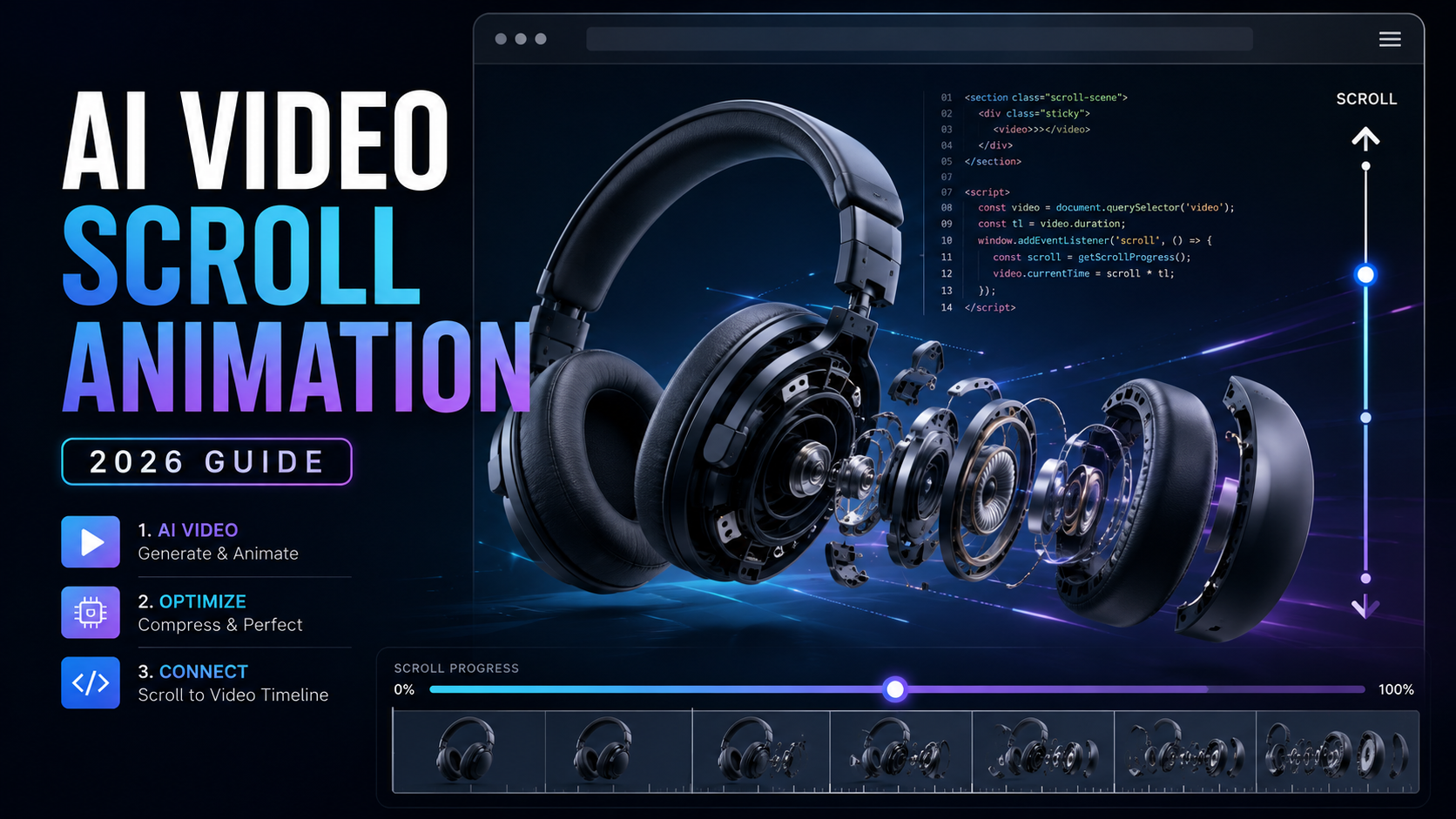
How to Build an AI-Video Scroll Animation Page
A practical way to turn one AI-generated product image into a premium scroll-controlled animation—without building a 3D model or shipping hundreds of separate frames.
TL;DR
Start with a strong 16:9 product image, use it as the first frame of an image-to-video generation, keep the best result from several inexpensive generations, compress the final clip for web delivery, and connect the video timeline to page scroll progress with JavaScript.
- Use a reference image so the product stays visually consistent.
- Frame the product tightly enough for small mechanical details to remain visible.
- Generate several variations instead of assuming the most expensive model will always win.
- Strip unnecessary audio and create frequent keyframes for responsive seeking.
- Throttle scroll updates with
requestAnimationFrame().
On this page
1. Why the visual asset is the hard part 2. Step 1: create the master product image 3. Step 2: turn the still into motion 4. Step 3: test multiple generations 5. Step 4: optimize the video for scrubbing 6. Step 5: connect the clip to scrolling 7. Performance checks that matter 8. Budget and production planning 9. Where the technique breaks 10. Frequently asked questionsWhy the visual asset is the hard part
Scroll-based product storytelling is not new. The front-end logic is straightforward: keep a section pinned, calculate a progress value between 0 and 1, and use that value to choose the visual state the visitor should see.
The expensive part has traditionally been everything that happens before the JavaScript. A polished product animation usually begins with either a 3D model or a carefully rendered image sequence. Both can require specialized software, time, and production skill.
Modern image-to-video tools offer a third route. Instead of modeling the object in 3D, you can create a single reference image, animate that image, then use the resulting video as the timeline the visitor scrubs through.
What you need
Step 1: create the master product image
Build the project around one excellent still image. Think of it as your visual master: every later generation inherits its composition, materials, lighting, proportions and flaws.
A strong prompt structure
Studio product photograph, landscape composition.
A premium pair of matte charcoal over-ear headphones,
large circular ear cups, thick memory-foam pads,
visible brushed-metal hinges, fine screws and panel seams.
The product fills most of the frame.
Neutral seamless background, soft key light,
subtle rim light, high mechanical detail,
no logo, no text, no brand marks.
Set the aspect ratio in the generator’s actual controls when possible instead of relying only on words such as “widescreen” in the prompt. You want the delivered source frame to match the aspect ratio you intend to use in the page.
What makes a good source frame?
- The object occupies a large portion of the frame.
- Edges are sharp and materials are clearly distinguishable.
- Small parts are visible instead of hidden in shadow.
- The background is simple enough that motion remains readable.
- There is no tiny printed text that the video model must preserve.
Using an AI image tool?
Replace the buttons below with your own affiliate destinations. The link structure is already configured with sponsored-link attributes.
Try My Recommended Image Tool See My AI Creator ToolkitStep 2: turn the still into motion
Upload the master image as the starting frame of the video generation. Do not ask the model to reinvent the same headphones from text alone. Your goal is animation, not product redesign.
Example motion prompt
The transformation starts immediately and continues through the full clip.
The headphones slowly separate into a clean exploded view:
ear pads move outward, outer cup shells separate,
driver assemblies slide forward, hinge pieces drift apart,
and the headband rises slightly.
Each component retains the same material, shape and color.
Camera motion is subtle and steady.
Neutral studio background, premium product visualization,
no labels, no logos, no extra objects.
Describe the components you want to see move. That gives the model a useful structural plan. Avoid stuffing the prompt with conflicting speed instructions and cinematic camera commands.
Step 3: test multiple generations
A common production mistake is to compare only model names or price tiers. Generative video has meaningful run-to-run variation, so the smartest comparison is often several outputs from the same settings.
Generate a small batch, watch the last quarter of each clip, and choose the version with the cleanest separation, the fewest duplicate pieces, and the most stable product identity.
| Run | What to inspect | Decision |
|---|---|---|
| Variation A | Clean motion, moderate number of parts | Keep as backup |
| Variation B | Little motion or product remains mostly assembled | Reject |
| Variation C | Rich detail, stable geometry, readable final state | Primary asset |
Choose based on the page, not the model badge
For a scroll hero, you do not necessarily need perfect cinema-quality motion. You need frames that remain convincing when the visitor stops at arbitrary points. A less expensive generation can be excellent if the individual frames are coherent.
Step 4: optimize the video for scrubbing
A normal streaming video is optimized for playback from beginning to end. A scroll-controlled video behaves differently: the browser may jump to many positions in rapid succession. That means seeking efficiency matters.
Remove audio
ffmpeg -i hero-master.mp4 -an -c:v copy hero-silent.mp4A scroll hero does not need an audio track. Removing it reduces unnecessary payload and avoids confusion around autoplay policies.
Encode a web version with frequent keyframes
ffmpeg -i hero-silent.mp4 \
-an \
-vf scale=1280:-2 \
-c:v libx264 \
-crf 28 \
-preset slow \
-g 8 \
-keyint_min 8 \
-sc_threshold 0 \
-movflags +faststart \
-pix_fmt yuv420p \
hero-web.mp4
The -g 8 setting creates a relatively dense keyframe interval. This normally increases file size
compared with a sparse streaming encode, but it can make random seeking feel much more responsive.
+faststart matters
It moves important MP4 metadata toward the front of the file so the browser can begin working with the
video sooner instead of waiting for the entire asset.
Think in tradeoffs
You rarely get maximum resolution, extremely dense keyframes, and a tiny file at the same time. For most article heroes, a well-compressed 720p or 1080p source is more practical than shipping a huge master.
Step 5: connect the clip to scrolling
The production version uses a sticky container and maps scroll progress to the video’s
currentTime. The important part is limiting updates so you do not flood the browser with seek requests.
HTML
<section class="scroll-video" id="scrollVideo">
  <div class="sticky-video">
    <video
      id="heroVideo"
      muted
      playsinline
      preload="auto"
      poster="hero-poster.jpg"
    >
      <source src="hero-web.mp4" type="video/mp4">
    </video>
  </div>
</section>
CSS
.scroll-video{
  height:300vh;
}
.sticky-video{
  position:sticky;
  top:0;
  height:100vh;
  display:grid;
  place-items:center;
  overflow:hidden;
}
.sticky-video video{
  width:min(1200px,100%);
  height:auto;
}
JavaScript
const section = document.querySelector('#scrollVideo');
const video = document.querySelector('#heroVideo');

let ticking = false;
let duration = 0;

video.addEventListener('loadedmetadata', () => {
  duration = video.duration || 0;
});

function updateVideo(){
  const rect = section.getBoundingClientRect();
  const scrollable = section.offsetHeight - window.innerHeight;
  const passed = Math.min(Math.max(-rect.top, 0), scrollable);
  const progress = scrollable > 0 ? passed / scrollable : 0;

  if (duration) {
    video.currentTime = progress * duration;
  }

  ticking = false;
}

window.addEventListener('scroll', () => {
  if (!ticking) {
    requestAnimationFrame(updateVideo);
    ticking = true;
  }
}, { passive:true });
The requestAnimationFrame() gate prevents the page from creating more visual updates than the
browser can reasonably draw. The passive scroll listener also tells the browser that your handler is not
going to block scrolling.
muted and playsinline on the video element. Also provide a poster image so the
hero does not look empty while the first decodable frame is becoming available.
Performance checks that matter
Do not judge this effect only on a fast desktop. The exact same animation can feel premium on a workstation and laggy on a mid-range phone.
Test these four things
- Initial asset weight: how many bytes arrive before the animation can be used?
- Seek latency: how quickly can the decoder display a frame after a timeline jump?
- Main-thread pressure: is the scroll handler doing unnecessary work?
- Real mobile behavior: test Safari/WebKit and Chrome, not just desktop emulation.
An image sequence still makes sense when frame-perfect control matters more than payload. For many marketing pages, however, a compressed video is simpler to deploy and maintain.
Budget and production planning
Your real cost is not only the final successful generation. Budget for failed source images, weak video runs, experimental prompts, and re-encodes. The best way to control spend is to validate the source frame before generating a large batch of videos.
| Production stage | Keep costs under control by… |
|---|---|
| Reference image | Lock composition, aspect ratio and product detail before video generation. |
| Video generation | Run a small batch and compare outputs at identical settings. |
| Web encoding | Create several compressed versions locally; encoding tests cost no generation credits. |
| Deployment | Use CDN delivery and cache the final MP4 aggressively. |
Want to build pages like this faster?
Add your AI-tool, hosting, course, or software affiliate links here. The design intentionally matches the long-form guide flow without copying another site’s protected wording or branding.
Try the Tool I Recommend See My Recommended HostingWhere this technique breaks
AI-generated scroll footage is impressive, but it is not the right tool for every product or every type of page.
- Tiny product labels: small typography can distort from frame to frame.
- Engineering documentation: generated internal parts may look plausible without being mechanically accurate.
- Regulated or safety-critical products: use authentic, verifiable visual documentation instead of synthetic internals.
- Very long sequences: longer clips increase decode work and download size.
- Exact repeatability: generative outputs may vary, so preserve the exact source file you approved.
When to use a real 3D model instead
Choose 3D when visitors must rotate the product freely, zoom into accurate components, switch colors, inspect dimensions, or interact with the object beyond one controlled animation path.
Frequently asked questions
Can AI video really create an exploded-product animation?
Yes, especially when the starting frame clearly shows the parts and materials. Treat the result as a marketing visualization rather than a mechanically accurate teardown unless you validate every detail.
Do I need a 3D model?
Not for a single cinematic scroll sequence. A generated or photographed starting frame plus image-to-video can be enough. You still need 3D for interactive rotation or engineering-level accuracy.
Should I use video or an image sequence?
Use video when compact delivery and simple deployment matter. Use an image sequence when exact frame-level control is more important than file count and payload.
Why does the video stutter when I scroll quickly?
Common causes include sparse keyframes, an oversized source file, too many direct currentTime
updates, or mobile decoding limitations. Re-encode the clip and throttle the scroll handler.
Will this work in OceanWP?
Yes. Paste this code into a WordPress Custom HTML block or an Elementor HTML widget. The outer wrapper keeps the CSS scoped so it is less likely to conflict with OceanWP.
Can I replace the demo with my own MP4?
Yes. The illustration at the top is only a built-in demonstration. For production, upload your MP4 and poster image to WordPress, then use the video-based HTML/CSS/JavaScript shown in Step 5.
Final checklist before publishing
- Upload a compressed MP4 and a poster image to your WordPress Media Library.
- Replace all
YOUR_AFFILIATE_LINK_...placeholders. - Test the page at mobile, tablet and desktop widths.
- Verify that the sticky animation does not overlap your OceanWP header.
- Test with Safari on an actual iPhone if iOS visitors matter to your audience.
- Add your affiliate disclosure and privacy/cookie requirements.
- Compress any additional screenshots before uploading them.
Affiliate disclosure: Some links on this page may be affiliate links. If you purchase through one of those links, the publisher may earn a commission at no additional cost to you. Always verify current pricing, model availability and product terms directly with the provider before purchasing.